
Mellanox MLNX-OS® User Manualfor SX1018HP Ethernet Managed Blade Switch


Rev 1.6.9
Mellanox Technologies
31
Mellanox Technologies Confidential
3.2.2 System Menu
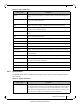
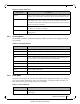
The System menu makes available the following sub-menus (listed in order of appearance from
top to bottom):
Routing Used to set, remove or display the default gateway, and the static and dynamic
routes.
Hostname Used to set or modify the hostname.
Used to set or delete static hosts.
DNS Used to set, remove, modify or display static and dynamic name servers.
Login Messages Used to edit the login messages: Message of the Day (MOTD), Remote Login
message, and Local Login message.
ARP Used to add static and dynamic ARP entries, and to clear the dynamic ARP
cache.
IPSec Used to configure IPSec feature.
Neighbors Used to display IPv6 neighbor discovery protocol.
Virtual Switch Mgmt Used to set the system profile.
Web Used to configure Web user interface and proxy settings.
SNMP Used to configure SNMP attributes, SNMP admin user, and trap sinks.
Email Alerts Used to define the destination of email alerts and the recipients to be notified.
XML gateway Provides an XML request-response protocol to get and set hardware manage-
ment information.
Logs Used to set up system log files, remote log sinks, and log formats.
Configurations Used to manage, activate, save, and import MLNX-OS SwitchX configuration
files, and to execute CLI commands.
Date and Time Used to set the date, time, and time zone of the switch system.
NTP Used to set NTP (Network Time Protocol) and NTP servers.
Licensing Used to manage MLNX-OS licenses.
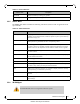
Table 15 - System Submenus
Submenu Title Description
Modules Displays a graphic illustration of the system modules. By moving the mouse
over the ports in the front view, a pop-up caption is displayed to indicate the sta
-
tus of the port. The port state (active/down) is differentiated by a color scheme
(green for active, gray/black for down). By moving the mouse over the rear view,
a pop-up caption is displayed to indicate the leaf part information.
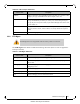
Table 14 - Setup Submenus
Submenu Title Description