
Service manual




Chapter 6 Replacing Parts
84
CAUTION Wear a wrist strap and use a static-dissipating work surface connected to the
chassis when handling components. Ensure that the metal of the wrist strap
contacts your skin.
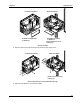
6. Remove the bezel. If necessary, temporarily remove the I/O fans.
7. Disconnect the signal cable (ribbon cable) and the power cable from the rear of the flexible disk
drive.
8. Use the T-15 driver to remove the two screws holding the flexible disk drive to the front of the
chassis.
Flexible Disk Drive Removal
9. Side the drive forward and out of the chassis.
10. Move the mounting brackets from the replacement drive to the flexible disk drive and reverse
the above procedure.
NOTE The flexible disk drive connectors are keyed. Make sure they are fully seated.
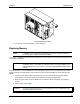
Replacing Hot-Swap Drive
CAUTION You must remove the drive slowly to ensure the drive heads are parked prior to
removal. Follow these instructions to prevent handling damage, such as head slaps
or head actuator unlocking.
1. To unlock the drive, push the locking latch in and then pull the ejector handle toward you.