
Service manual




Chapter 6 Replacing Parts
80
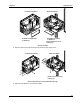
SCSI Cable
P2 Power Cable
Disconnect SCSI and P2 Power Cables
7. Slide out the primary mass storage cage.
Removing the Secondary Cage
Follow these instructions to remove the secondary cage:
1. Allow time for your hot-swap disk drives to spin down, then remove all hard disk drives from the
mass storage cage where you will install the duplex board.
CAUTION Do not remove hot-swap disk drives until they have had time to spin down.
2. Remove the front bezel.
3. Remove Cover 1 as follows
a. If your NetServer is in the pedestal orientation, remove the left cover.
b. If your NetServer is in the rack-mounted orientation, extend the rack's anti-tip foot or ensure
that the anti-tip feature is installed. Then pull the NetServer forward to extend it on the rack
rails, and then remove the top cover.
4. Remove eight screws that hold the secondary mass storage cage in place.