
Service manual




Chapter 6 Replacing Parts
76
4. If you have a rack-mounted LH3000r, then consider removing the signal cables from the rear of
the enclosure before extending the enclosure on the slides (if you don't have a cable
management arm). If necessary, label the signal cables to support re-connecting them.
5. Remove the top cover (rack-mount orientation) or the side cover (pedestal version).
CAUTION Wear a wrist strap and use a static-dissipating work surface connected to the
chassis when handling components. Ensure that the metal of the wrist strap
contacts your skin.
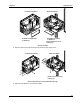
6. Locate the DIMMs on the system board.
DIMM Socket 0
DIMM Socket 2
DIMM Socket 1
DIMM Socket 3
DIMM Locations
7. To remove the DIMM, open the retaining clips at the side of the DIMM and lift it out.
Removing a DIMM