
Service manual




Chapter 6 Replacing Parts
101
Replacing Rear Fans
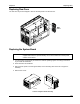
The rear fans may be hot-swapped. Remove the side panel to access the fans.
Rear
Fans
Replacing the System Board
CAUTION Extend the anti-tip foot prior to any work on a rack-mount server. The power
supplies will continue to provide standby current to the NetServer until the power
cable is disconnected.
1. Log off all users and gracefully shut down the network operating system according to directions
in your NOS documentation.
2. Power down the HP NetServer.
3. Disconnect the power cord and signal cables, and if necessary, label each one to support re-
assembly.
4. Remove the covers.
LH 3000
LH 3000r
Location of System Board Assembly