
User's Manual




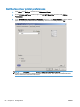


Set the billing-code configuration
HP MFP Send Fax supports the use of billing codes when sending faxes.
1. From the Home screen, scroll to and touch the Administration button.
2. Open the following menus:
●
Fax Settings
●
Fax Send Settings
●
Fax Send Setup
●
Billing Codes
3. Touch the Enable Billing Codes feature to enable billing codes.
NOTE: To disable billing codes, deselect the Enable Billing Codes feature, touch the Save
button, and then skip the remaining steps.
To allow users to edit billing codes, touch the Allow users to edit billing codes feature.
4. Touch the Default Billing Code text box to open the keyboard.
5. Enter the billing code and then touch the OK button.
6. Touch the Minimum Length text box to open the keypad.
7. Type the minimum number of digits you want in the billing code, and then touch the OK button.
8. Touch the Save button.
64 Chapter 3 Configuration ENWW