
User's Manual




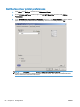


6. Browse to and select a bitmap image file, such as a company logo.
NOTE: The bitmap image is converted to grayscale on the cover sheet and is located in the top
one-third of the page.
7. Click OK.
NOTE: To set all of the default information at the same time, select the sender information, fax
quality, notification, and preview settings and then click OK.
NOTE: When cover page is used with multiple recipients, the preview will only show the cover page
for the first recipient. However, the cover page will be sent separately for each recipient. Only one
recipient's name is shown on each cover page.
60 Chapter 3 Configuration ENWW