
User's Manual






Set the cover page information
Standardize the look of the fax cover page by using a default cover page. Fields are available for
notes, a subject line, and a company logo or other image. The cover-page settings can be modified
on the Fax Job tab for individual fax jobs.
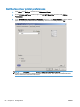
1. On the Setup tab, click Edit Defaults.
2. Under Include With Fax in the Default Settings dialog box, select Cover Page (Single recipient
only).
3. In the Notes text box, type the default notes.
4. In the Subject text box, type the default subject line.
5. Click Overlay to include an image on the cover page.
ENWW Set the cover page information 59