
HP VPN Server Appliance sa3110/sa3150/sa3400/sa3450 Network Layout Reference Guide

HP VPN Server Appliance SA3110/SA3150/SA3400/SA3450 Network Layout Reference Guide
18 Hewlett-Packard VPN Server Appliance SA3110/SA3150/SA3400/SA3450 Network Layout Reference Guide
LAN-to-LAN Scenarios
LAN-to-LAN ScenariosLAN-to-LAN Scenarios
LAN-to-LAN Scenarios
In Parallel With
In Parallel With In Parallel With
In Parallel With
a Firewall
a Firewall a Firewall
a Firewall
(Without NAT)
(Without NAT)(Without NAT)
(Without NAT)
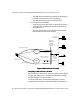
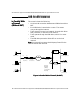
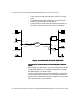
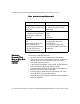
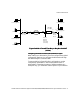
This scenario shows the following:
• A LAN-to-LAN connection between two VPN devices with no
NAT.
• Each VPN device is attached to a router. The routers
connect through the Internet.
• Traffic travels from one local network, through the LAN-to-
LAN connection, to the other local network.
• Traffic passes through the VPN device, which is in router
mode.
• The VPN device passes the VPN traffic on to the local
network.
Note:
Note: Note:
Note: You must add a route to the third-party firewall for the
network behind VPN device B.
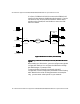
Figure: In Parallel With a Firewall (No NAT)
Figure: In Parallel With a Firewall (No NAT)Figure: In Parallel With a Firewall (No NAT)
Figure: In Parallel With a Firewall (No NAT)
VPND
Internet
Router/
Default GW
VPND
Desktop System
Laser Printer
Desktop System
File Server
File Server
Laser Printer
Router Mode
Router Mode
E0 E1
E1 E0
Router/
Default Device
Internal
Network
(directly
connected to
Internet)
Firewall