
HP VPN Server Appliance sa3110/sa3150/sa3400/sa3450 Network Layout Reference Guide

Client Scenarios
Hewlett-Packard VPN Server Appliance SA3110/SA3150/SA3400/SA3450 Network Layout Reference Guide
9
Table:
Table:Table:
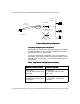
Table: Bridge Configuration Parameters
Bridge Configuration Parameters Bridge Configuration Parameters
Bridge Configuration Parameters
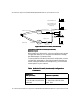
Edge Router
Edge Router Edge Router
Edge Router
Configuration
ConfigurationConfiguration
Configuration
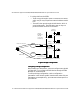
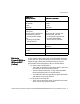
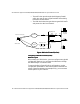
In this scenario, the VPN device acts as an “edge” router; it is the
only device between the Internet and the local network.
• The VPN Client makes a secure VPN connection through the
Internet to the VPN device.
• The VPN device is configured to router mode.
• The VPN device may or may not perform firewall functions
on the traffic.
• The VPN Client has no means to perform direct dial to the
local network; it must go through a VPN tunnel.
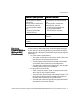
NAT by Router
NAT by RouterNAT by Router
NAT by Router Inline No NAT
Inline No NATInline No NAT
Inline No NAT
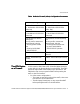
Interface E0:
Mode: Red
Interface E0:
Mode: Red
Interface E1:
Mode: Red
Interface E1:
Mode: Red
Bridge IP: 10.250.128.2 Bridge IP: 205.25.128.2
255.255.255.0
Configuration file entries/routing
info:
security profile remote user
remote tunnel johndoe
security-profile remote user
Configuration file entries/routing
info:
security profile remote user
remote tunnel johndoe
security-profile remote user
VPN Client IP: 10.250.128.3 VPN Client IP: Uses ISP IP (no
client IP)
Subnet: 10.250.128.0 (net-include) Subnet: 205.25.128.0
ISP IP: 209.29.128.50 ISP IP: 209.29.128.50