
HP VPN Server Appliance sa3110/sa3150/sa3400/sa3450 - Installation Guide

Appendix — Network Infrastructure Checklists
A-12 Hewlett-Packard VPN Server Appliance SA3110/SA3150/SA3400/SA3450 Installation Guide
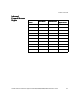
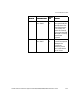
Port Combinations Table
Port Combinations TablePort Combinations Table
Port Combinations Table
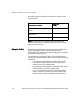
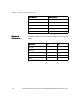
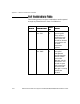
The following protocol and port combinations must be opened
through any firewall that is in front of a VPN device.
Protocol
ProtocolProtocol
Protocol Destination Port
Destination PortDestination Port
Destination Port
Source
Source Source
Source
Port
PortPort
Port
Actions
ActionsActions
Actions
UDP In: 2233
Out: 2233
All
All
These data packets
are encrypted.
They must be
allowed through
the firewall and
should be directed
to the device and
no other
destination
address.
UDP In: 10025
Out: 10025
All
All
These packets are
encrypted
management
packets between
the HP SA3000
Series VPN
Manager and the
VPN device. You
should not open
this firewall rule
unless the VPN
Manager is running
outside the
firewall.