
HP VPN Server Appliance sa3110/sa3150/sa3400/sa3450 - Virtual Private Networking Concepts Guide



Multiuser Tunnels
Hewlett-Packard Company Virtual Private Networking Concepts Guide
5-17
Full Access
Full AccessFull Access
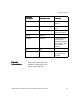
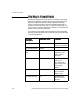
Full Access The following table shows a tunnel that would allow a group
(called audit) full access to the red (trusted) network available
through VPN device A, while not allowing access to the network
available through VPN device B. Note that a maximum of 30
members of the group will be allowed to use the tunnel at once.
In the previous table, group audit is given complete access to the
trusted network.
Limited Access
Limited AccessLimited Access
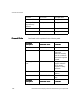
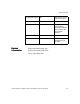
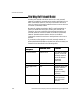
Limited Access The next table shows how to use a combination of a tunnel and
a firewall rule to give a group limited access to the red (trusted)
network. For example, to allow a group called sales access to the
Web server available through VPN device A while not allowing
access to the rest of that network or to the network available
through VPN device B, a tunnel is defined for the group to the
black side of the VPN device and a firewall rule is created to
allow the traffic from the black (untrusted) network to the red
(trusted) network.
Tunnel Definition
Tunnel Definition Tunnel Definition
Tunnel Definition
Parameters
ParametersParameters
Parameters
VPN Device A
VPN Device AVPN Device A
VPN Device A VPN Device B
VPN Device BVPN Device B
VPN Device B
Group name audit No access
Client IP 10.1.1.193 Not applicable
Number of clients 30
Secure profile (must
be previously
defined)
dial-up Not applicable
Tunnel mode Red Not applicable
IP route Not required Not applicable
Tunnel Definition
Tunnel Definition Tunnel Definition
Tunnel Definition
Parameters
ParametersParameters
Parameters
VPN Device A
VPN Device AVPN Device A
VPN Device A VPN Device B
VPN Device BVPN Device B
VPN Device B
Group name sales No access