
HP VPN Server Appliance sa3110/sa3150/sa3400/sa3450 Network Layout Reference Guide



Client Scenarios
Hewlett-Packard VPN Server Appliance SA3110/SA3150/SA3400/SA3450 Network Layout Reference Guide
3
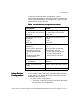
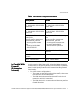
To set up a one-armed router configuration, use the
configuration parameters in the following table. Note that the
values of these parameters are examples only; you must enter
values specific to your network.
Table:
Table:Table:
Table: O
O O
O
ne-Armed Router Configuration Parameters
ne-Armed Router Configuration Parametersne-Armed Router Configuration Parameters
ne-Armed Router Configuration Parameters
Inline Router
Inline Router Inline Router
Inline Router
Configuration
ConfigurationConfiguration
Configuration
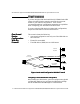
In this scenario, VPN Client traffic is handled either through a
router (inline) or by directly dialing into the public-switched
telephone network (PSTN).
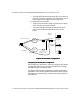
• For inline router configurations:
— The router accepts all incoming client traffic then trans-
fers the traffic to the VPN device.
NAT by Router
NAT by RouterNAT by Router
NAT by Router No NAT
No NATNo NAT
No NAT
Interface E0:
IP: 10.250.128.2 255.255.255.0
Mode: Red
Interface E0:
IP: 205.25.128.2 255.255.255.0
Mode: Red
Interface E1: (not used for
one-armed)
IP: NA
Mode: NA
Interface E1: (not used for one-
armed)
IP: NA
Mode: NA
Configuration file entries/
routing info:
security profile remote user
remote tunnel johndoe
security-profile remote
user
client-ip 10.250.128.2
255.255.255.255
Configuration file entries/routing
info:
security profile remote user
remote tunnel johndoe
security-profile remote user
ip route 209.29.128.50
255.255.255.255 john doe
HP SA3000 Series VPN Client
IP: 10.250.128.3
VPN Client IP: Uses ISP IP (no
client IP)
Subnet: 10.250.128.0 (net-
include)
Subnet: 205.25.128.0 (net-include)
ISP IP: 209.29.128.50 ISP IP: 209.29.128.50