
HP VPN Server Appliance sa3110/sa3150/sa3400/sa3450 Network Layout Reference Guide



HP VPN Server Appliance SA3110/SA3150/SA3400/SA3450 Network Layout Reference Guide
2 Hewlett-Packard VPN Server Appliance SA3110/SA3150/SA3400/SA3450 Network Layout Reference Guide
Client Scenarios
Client ScenariosClient Scenarios
Client Scenarios
If you are using the VPN device with the HP SA3000 Series VPN
Client, skim the following scenarios and find the ones most
similar to your network configuration. Then, use the
corresponding table of configuration parameters as a guideline
when configuring your VPN device and VPN Client.
If you are using the VPN device in LAN-to-LAN configurations,
skip to the next section “LAN-to-LAN Scenarios.”
One-Armed
One-Armed One-Armed
One-Armed
Router
Router Router
Router
Configuration
Configuration Configuration
Configuration
With No
With No With No
With No
Firewall
Firewall Firewall
Firewall
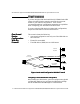
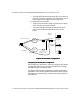
This scenario shows the following:
• One-armed configuration uses only one of the VPN device’s
two interfaces.
• Firewall is not enabled.
• The VPN device (VPND) acts as a VPN server.
Figure: One-Armed Configuration With No Firewall
Figure: One-Armed Configuration With No FirewallFigure: One-Armed Configuration With No Firewall
Figure: One-Armed Configuration With No Firewall
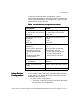
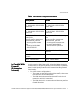
Configuring a One-Armed Router Configuration
Configuring a One-Armed Router Configuration Configuring a One-Armed Router Configuration
Configuring a One-Armed Router Configuration
When setting up a VPN device, you must configure many global
configuration settings. You configure the VPN device through
the HP SA3000 Series VPN Manager or command shell.
Desktop
System
Desktop
System
Internal
Network
Internet
Router
VPND
Internet
Connection
Direct
Dial
Laser Printer
PSTN
Router or Remote
Access Server
No Firewall
Functions
Router Mode
E0
VPN Client