
HP VPN Server Appliance sa3110/sa3150/sa3400/sa3450 Network Layout Reference Guide

LAN-to-LAN Scenarios
Hewlett-Packard VPN Server Appliance SA3110/SA3150/SA3400/SA3450 Network Layout Reference Guide
29
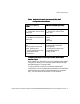
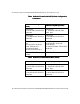
Table:
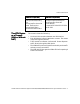
Table:Table:
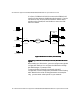
Table: VPN Device as a Firewall With NAT Configuration
VPN Device as a Firewall With NAT Configuration VPN Device as a Firewall With NAT Configuration
VPN Device as a Firewall With NAT Configuration
Parameters
ParametersParameters
Parameters
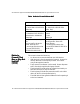
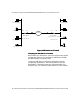
Table:
Table:Table:
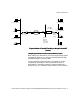
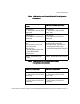
Table: VPN Device As a Firewall Without NAT
VPN Device As a Firewall Without NAT VPN Device As a Firewall Without NAT
VPN Device As a Firewall Without NAT
Configuration Parameters
Configuration ParametersConfiguration Parameters
Configuration Parameters
VPN Device A (NAT by
VPN Device A (NAT by VPN Device A (NAT by
VPN Device A (NAT by
Router)
Router)Router)
Router)
VPN Device B (NAT by Router)
VPN Device B (NAT by Router)VPN Device B (NAT by Router)
VPN Device B (NAT by Router)
Interface E0:
IP: 10.250.128.2 255.255.255.0
Mode: Red
Interface E0:
IP: 10.250.128.2 255.255.255.0
Mode: Red
Interface E1:
IP: 192.168.10.2 255.255.255.0
Mode: Red
Interface E1:
IP: 192.168.10.2 255.255.255.0
Mode: Red
Config file entries/routing
info:
security-profile site-to-site
site-to-site tunnel
SanFrancisco
security-profile site-to-site
route 209.29.128.50
255.255.255.0
Config file entries/routing info:
security-profile site-to-site
site-to-site tunnel SanFrancisco
security-profile site-to-site
route 209.29.128.50 255.255.255.0
Subnet: 10.250.128.0 (net-
include)
Subnet: 10.250.128.0 (net-include)
VPN Device A (No NAT)
VPN Device A (No NAT)VPN Device A (No NAT)
VPN Device A (No NAT) VPN Device B (No NAT)
VPN Device B (No NAT)VPN Device B (No NAT)
VPN Device B (No NAT)
Interface E0:
IP: 205.25.128.2 255.255.255.0
Mode: Red
Interface E0:
IP: 205.25.128.2 255.255.255.0
Mode: Red
Interface E1:
IP: 210.35.129.2 255.255.255.0
Mode: Red
Interface E1:
IP: 210.35.129.2 255.255.255.0
Mode: Red