
HP VPN Server Appliance sa3110/sa3150/sa3400/sa3450 Network Layout Reference Guide

HP VPN Server Appliance SA3110/SA3150/SA3400/SA3450 Network Layout Reference Guide
28 Hewlett-Packard VPN Server Appliance SA3110/SA3150/SA3400/SA3450 Network Layout Reference Guide
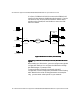
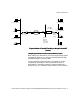
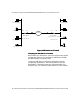
Figure: VPN Device as a Firewall
Figure: VPN Device as a Firewall Figure: VPN Device as a Firewall
Figure: VPN Device as a Firewall
Configuring the VPN Device as a Firewall
Configuring the VPN Device as a FirewallConfiguring the VPN Device as a Firewall
Configuring the VPN Device as a Firewall
When setting up a VPN device, you must configure many global
configuration settings. You configure the VPN device through
the VPN Manager or command shell.
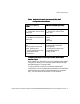
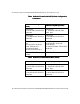
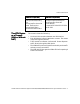
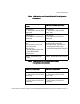
To set up a VPN device as a firewall configuration, use the
configuration parameters in the following tables (with and
without NAT). Note that the values of these parameters are
examples only; you must enter values specific to your network.
May/May Not NAT
VPND A Router Router VPND B
Desktop SystemDesktop System
Desktop System
Laser Printer
Desktop System
File Server
File Server
Laser Printer
With Firewall Functions Enabled
Router Mode
May/May Not NAT
Router Mode
E0 E1
E1 E0
Internet