
HP VPN Server Appliance sa3110/sa3150/sa3400/sa3450 Network Layout Reference Guide

HP VPN Server Appliance SA3110/SA3150/SA3400/SA3450 Network Layout Reference Guide
24 Hewlett-Packard VPN Server Appliance SA3110/SA3150/SA3400/SA3450 Network Layout Reference Guide
Table:
Table:Table:
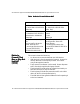
Table: Behind a Firewall Without NAT
Behind a Firewall Without NAT Behind a Firewall Without NAT
Behind a Firewall Without NAT
Behind a
Behind a Behind a
Behind a
Firewall That
Firewall That Firewall That
Firewall That
May or May Not
May or May Not May or May Not
May or May Not
Use NAT
Use NAT Use NAT
Use NAT
(Inline)
(Inline)(Inline)
(Inline)
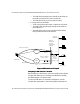
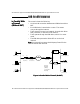
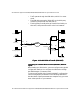
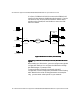
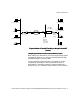
This scenario shows the following:
• A LAN-to-LAN connection between two VPN devices.
• VPN device A is directly attached to Router A. Router B is
directly attached to a third-party firewall. The routers
connect through the Internet.
• Traffic travels from Router A to Router B. Router B passes
traffic directly through the third-party firewall.
• The third-party firewall performs firewall functionality on
the traffic and may or may not use NAT.
• The third-party firewall then passes the traffic to the VPN
device B, which is directly attached to it.
• The VPN device B decrypts the VPN traffic before passing it
to the local network.
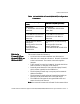
VPN Device A (No NAT)
VPN Device A (No NAT)VPN Device A (No NAT)
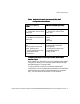
VPN Device A (No NAT) VPN Device B (No NAT)
VPN Device B (No NAT)VPN Device B (No NAT)
VPN Device B (No NAT)
Interface E0:
IP: 205.25.128.2 255.255.255.0
Mode: Red
Interface E0:
IP: 205.25.135.2 255.255.255.0
Mode: Red
Interface E1:
IP: 209.80.10.25 255.255.255.0
Default device: 209.80.10.2
Mode: Red
Interface E1: (Not used for one-
armed)
IP: N/A
Mode: N/A
Config file entries/routing
info:
security-profile site-to-site
tunnel SanFrancisco
security-profile site-to-site
ip route 205.25.135.0
255.255.255.0 205.25.135.2
Config file entries/routing info:
security-profile site-to-site
tunnel Boston
security-profile site-to-site
route 205.25.128.0 255.255.255.0
209.80.10.25