
HP VPN Server Appliance sa3110/sa3150/sa3400/sa3450 Network Layout Reference Guide

LAN-to-LAN Scenarios
Hewlett-Packard VPN Server Appliance SA3110/SA3150/SA3400/SA3450 Network Layout Reference Guide
23
Table:
Table:Table:
Table: Behind a Firewall (One-Armed) With NAT
Behind a Firewall (One-Armed) With NAT Behind a Firewall (One-Armed) With NAT
Behind a Firewall (One-Armed) With NAT
Configuration Parameters
Configuration ParametersConfiguration Parameters
Configuration Parameters
Configuring a Behind a Firewall (One-Armed) Without NAT
Configuring a Behind a Firewall (One-Armed) Without NAT Configuring a Behind a Firewall (One-Armed) Without NAT
Configuring a Behind a Firewall (One-Armed) Without NAT
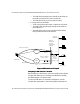
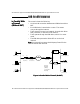
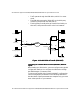
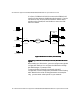
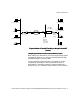
Network Layout
Network Layout Network Layout
Network Layout
When setting up a VPN device, you must configure many global
configuration settings. You configure the VPN device through
the VPN Manager or command shell.
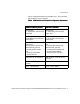
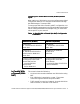
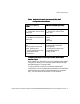
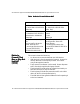
To set up a behind a firewall (one-armed) without NAT
configuration, use the configuration parameters in the following
table. Note that the values of these parameters are examples
only; you must enter values specific to your network.
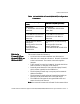
VPN Device A (NAT by
VPN Device A (NAT by VPN Device A (NAT by
VPN Device A (NAT by
Router)
Router)Router)
Router)
VPN Device B (NAT by Router)
VPN Device B (NAT by Router)VPN Device B (NAT by Router)
VPN Device B (NAT by Router)
Interface E0:
IP: 10.250.128.2 255.255.255.0
Mode: Red
Interface E0:
IP: 10.250.135.2 255.255.255.0
Mode: Red
Interface E1:
IP: 192.168.10.2 255.255.255.0
Mode: Red
Interface E1: (Not used for one-
armed)
IP: N/A
Mode: N/A
Config file entries/routing
info:
security-profile site-to-site
tunnel SanFrancisco
security-profile site-to-site
route 10.250.135.0
255.255.255.0
Config file entries/routing info:
security-profile site-to-site
tunnel Boston
security-profile site-to-site
route 209.29.128.50
255.255.255.255