
HP VPN Server Appliance sa3110/sa3150/sa3400/sa3450 Network Layout Reference Guide

HP VPN Server Appliance SA3110/SA3150/SA3400/SA3450 Network Layout Reference Guide
22 Hewlett-Packard VPN Server Appliance SA3110/SA3150/SA3400/SA3450 Network Layout Reference Guide
is in front of VPN device B (which routes to the VPN device B
interface for the subnet accessible through the tunnel). If you do
not add this route, local machines (with their default device
pointing to the firewall) will not be able to route to the VPN
device A network.
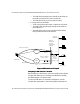
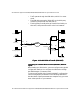
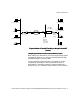
Figure: Behind a Firewall (One-Armed)
Figure: Behind a Firewall (One-Armed)Figure: Behind a Firewall (One-Armed)
Figure: Behind a Firewall (One-Armed)
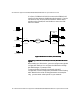
Configuring a Behind a Firewall (One-Armed) With NAT Network
Configuring a Behind a Firewall (One-Armed) With NAT Network Configuring a Behind a Firewall (One-Armed) With NAT Network
Configuring a Behind a Firewall (One-Armed) With NAT Network
Layout
Layout Layout
Layout
When setting up a VPN device, you must configure many global
configuration settings. You configure the VPN device through
the VPN Manager or command shell.
To set up a behind a firewall (one-armed) with NAT
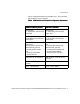
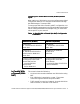
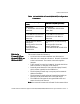
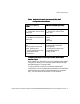
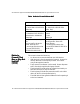
configuration, use the configuration parameters in the following
table. Note that the values of these parameters are examples
only; you must enter values specific to your network.
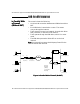
May/May Not
NAT
Internet
VPND A Router Router VPND B
Desktop SystemDesktop System
Desktop System
Laser Printer
Desktop System
File Server
Laser Printer
Router Mode
File Server
E0 E1 E0
Router Mode
Firewall