
HP VPN Server Appliance sa3110/sa3150/sa3400/sa3450 Network Layout Reference Guide

LAN-to-LAN Scenarios
Hewlett-Packard VPN Server Appliance SA3110/SA3150/SA3400/SA3450 Network Layout Reference Guide
21
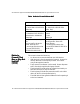
Table:
Table:Table:
Table: In Parallel With a Firewall (With NAT) Configuration
In Parallel With a Firewall (With NAT) Configuration In Parallel With a Firewall (With NAT) Configuration
In Parallel With a Firewall (With NAT) Configuration
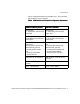
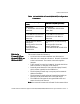
Parameters
ParametersParameters
Parameters
Behind a
Behind a Behind a
Behind a
Firewall (One-
Firewall (One-Firewall (One-
Firewall (One-
Armed) With or
Armed) With or Armed) With or
Armed) With or
Without NAT
Without NAT Without NAT
Without NAT
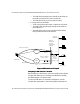
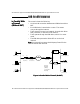
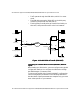
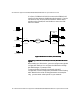
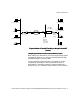
This scenario shows the following:
• A LAN-to-LAN connection between two VPN devices.
• VPN device A is attached to Router A. Router B is attached
to the local network. The routers connect through the
Internet.
• Traffic travels from one local network, through the LAN-to-
LAN connection, to the other local network.
• Router B passes the traffic first to the third-party firewall,
which resides in parallel to the VPN device.
• The third-party firewall may or may not perform network
address translation.
• The third-party firewall performs firewall functionality on
the traffic, then passes the traffic to the VPN device.
• The VPN device decrypts the encrypted VPN traffic and
passes it to the local network.
Note:
Note: Note:
Note: You must add a route to the firewall for the network that
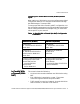
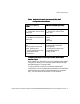
VPN Device A (NAT by
VPN Device A (NAT by VPN Device A (NAT by
VPN Device A (NAT by
Router)
Router)Router)
Router)
VPN Device B (NAT by Router)
VPN Device B (NAT by Router)VPN Device B (NAT by Router)
VPN Device B (NAT by Router)
Interface E0:
IP: 10.250.128.2 255.255.255.0
Mode: Red
Interface E0:
IP: 10.250.130.2 255.255.255.0
Mode: Red
Interface E1:
IP: 192.168.10.2 255.255.255.0
Default device: 192.168.10.4
Mode: Red
Interface E1:
IP: 192.168.12.2 255.255.255.0
Default device: 192.168.12.4
Mode: Red
Configuration file entries/
routing info:
security-profile site-to-site
tunnel Boston
route 209.29.128.50
255.255.255.0
Configuration file entries/routing
info:
security-profile site-to-site
tunnel SanFrancisco
route 209.29.128.50 255.255.255.0