
HP VPN Server Appliance sa3110/sa3150/sa3400/sa3450 Network Layout Reference Guide
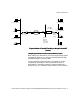

Client Scenarios
Hewlett-Packard VPN Server Appliance SA3110/SA3150/SA3400/SA3450 Network Layout Reference Guide
17
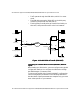
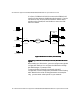
values of these parameters are examples only; you must enter
values specific to your network.
Table:
Table:Table:
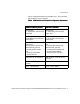
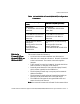
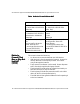
Table: VPN Device as a Firewall Configuration Parameters
VPN Device as a Firewall Configuration Parameters VPN Device as a Firewall Configuration Parameters
VPN Device as a Firewall Configuration Parameters
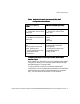
VPN Device (NAT by Router)
VPN Device (NAT by Router)VPN Device (NAT by Router)
VPN Device (NAT by Router) VPN Device (No NAT)
VPN Device (No NAT)VPN Device (No NAT)
VPN Device (No NAT)
Interface E0:
IP: 10.250.128.2 255.255.255.0
Mode: Red
Interface E0:
IP: 205.25.128.2 255.255.255.0
Mode: Red
Interface E1:
IP: 192.168.10.2 255.255.255.0
Mode: Black
Interface E1:
IP: 210.35.129.2 255.255.255.0
Mode: Black
Configuration file entries/
routing info:
security-profile remote user
remote tunnel johndoe
security-profile remote
user
client-ip 10.250.128.3
255.255.255.255
Configuration file entries/routing
info:
security-profile remote user
remote tunnel johndoe
security-profile remote user
ip route 209.29.128.50
255.255.255.255 johndoe
VPN Client IP: 10.250.128.3 VPN Client IP: Uses ISP IP (no
client IP)
Subnet: 10.250.128.0 (net-
include)
Subnet: 205.25.128.0 (net-include)
ISP IP: 209.29.128.50 ISP IP: 209.29.128.50