
HP VPN Server Appliance sa3110/sa3150/sa3400/sa3450 Network Layout Reference Guide

Client Scenarios
Hewlett-Packard VPN Server Appliance SA3110/SA3150/SA3400/SA3450 Network Layout Reference Guide
13
Behind a
Behind a Behind a
Behind a
Firewall With or
Firewall With or Firewall With or
Firewall With or
Without NAT
Without NAT Without NAT
Without NAT
(Inline)
(Inline)(Inline)
(Inline)
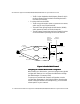
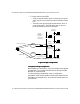
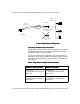
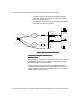
In this scenario, VPN Client traffic is handled either through a
router (inline) or by directly dialing in to the PSTN. The traffic
passes through a third-party firewall that may or may not
perform NAT before passing the traffic to the VPN device.
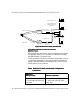
• For inline router configurations:
— The router accepts all incoming client traffic, then trans-
fers the traffic to the third-party firewall.
— The third-party firewall may or may not perform NAT
before passing the traffic to the VPN device.
— The VPN device then decrypts the encrypted VPN traffic
and passes it to the local network.
• For direct dial into the PSTN:
— Traffic may go through a router or remote access server,
which may or may not perform NAT.
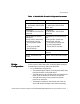
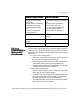
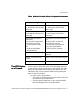
Interface E1: (Not used for
one-armed)
IP: NA
Mode: NA
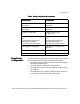
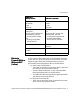
Interface E1: (Not used for one-
armed)
IP: NA
Mode: NA
Configuration file entries/
routing info:
security profile remote user
remote tunnel johndoe
security-profile remote
user
client-ip 10.250.128.3
255.255.255.255
Configuration file entries/routing
info:
security profile remote user
remote tunnel johndoe
security-profile remote user
ip route 209.29.128.50
255.255.255.255 johndoe
VPN Client IP: 10.250.128.3 VPN Client IP: Uses ISP IP (no
client IP)
Subnet: 10.250.128.0 (net-
include)
Subnet: 205.25.128.0 (net-include)
ISP IP: 209.29.128.50 ISP IP: 209.29.128.50
VPN Device
VPN Device VPN Device
VPN Device
(NAT by Router)
(NAT by Router)(NAT by Router)
(NAT by Router)
VPN Device (No NAT)
VPN Device (No NAT)VPN Device (No NAT)
VPN Device (No NAT)