
HP VPN Server Appliance sa3110/sa3150/sa3400/sa3450 Network Layout Reference Guide

HP VPN Server Appliance SA3110/SA3150/SA3400/SA3450 Network Layout Reference Guide
6 Hewlett-Packard VPN Server Appliance SA3110/SA3150/SA3400/SA3450 Network Layout Reference Guide
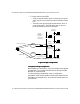
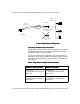
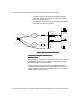
— Traffic is then handed to the third-party firewall, which
performs firewall functions before handing the traffic
onto the local network.
• For direct dial into the PSTN:
— Traffic may go through a router or remote access server,
which may or may not perform NAT.
— The traffic then goes through the VPN device (VPND),
which passes the traffic to the local network.
— The third-party firewall then performs firewall functions
on the traffic before passing it to the local network.
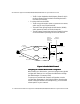
Figure: In Parallel With Firewall
Figure: In Parallel With FirewallFigure: In Parallel With Firewall
Figure: In Parallel With Firewall
Configuring an In Parallel With Firewall Configuration
Configuring an In Parallel With Firewall Configuration Configuring an In Parallel With Firewall Configuration
Configuring an In Parallel With Firewall Configuration
When setting up a VPN device, you must configure many global
configuration settings. You configure the VPN device through
the VPN Manager or command shell.
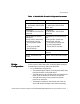
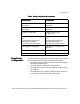
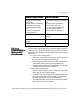
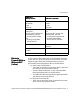
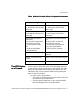
To set up an in parallel with firewall configuration, use the
configuration parameters in the following table. Note that the
values of these parameters are examples only; you must enter
values specific to your network.
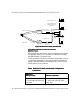
May/May Not NAT
Router
Mode
Internet
Router
VPND
Internet
Connection
Direct Dial
Firewall
Desktop System
File Server
Laser Printer
PSTN
Remote Access Server
Internal
Network A
Internal
Network B
(directly
connected
to Internet)
E1 E0
VPN Client
Router