
HP-UX SNAplus2 General Information (October 1998)

38 Chapter 2
Introducing SNAplus2
SNAplus2 Resources
Client/Server Support
Computers running SNAplus2 can be configured to communicate using
client/server protocols. When client/server protocols are used in a
network, all the computers using client/server protocols to communicate
in that network are referred to as a “domain.” Each computer in the
network specifies the same domain name when SNAplus2 is installed.
The computers running SNAplus2 in a client/server configuration can
take the following roles:
• A server contains an SNA node and its associated connectivity
components. The server provides SNA connectivity to applications on
the local system or on other machines in the same domain. Servers
must be HP-UX systems.
• A client does not contain SNA node components, but accesses them
through a server. A client can access one or more servers at the same
time, and can run concurrent applications as needed. Clients can be
HP-UX or Windows systems.
Servers and clients communicate across the SNAplus2 domain using
TCP/IP. The protocols used are different from those used by TN3270 and
support a wide range of applications, including 3270, 5250, RJE, APPC,
CPI-C, LUA, CSV, and NOF (HP-UX only).
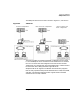
You can have one or more separate SNAplus2 domains on the same
physical network, using a unique name for each different domain. A
single SNAplus2 domain can correspond to a TCP/IP subnet, can be part
of a TCP/IP subnet (so that there are two or more separate SNAplus2
domains in the same subnet), or can span multiple subnets.
If the SNAplus2 domain has multiple servers, one server holds the
master copy of the SNAplus2 configuration. This server is known as the
master server. Other servers on the LAN can be identified as backup
servers. The configuration is copied to backup servers—either when they
are started, or when the master copy is changed—so that all backup
servers hold a copy of the latest information.