
Integrate Logins with HP CIFS Server, HP-UX, and Windows 2003R2/2008


53
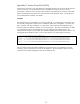
In the “Configure Users and Groups” topic earlier, a UNIX group “scoobies” was created. The UNIX
group scoobies is fully functional on the HP-UX server due to the LDAP-UX configuration. However, a
Windows client cannot display and manage the UNIX scoobies group in the client File Explorer until
several tasks are completed.
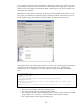
Recall that the scoobies group is a Windows group that also has POSIX RFC 2307 attributes. So the
same group is represented to two operating systems: Windows and UNIX. The Windows client can
see the Windows group name displayed in the File Explorer, but not the UNX group name.
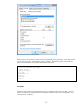
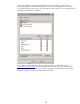
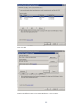
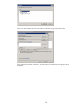
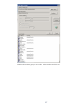
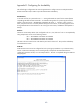
In the graphic above, note that the group scoobies is not listed. This is the user/group listing of UNIX
users/groups on atcuxvm6.rose.hp.com (note the “From this location” box). The UNIX group
scoobies exists, but is not displayed. So we must map the two group IDs together on the HP-UX
server.
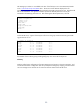
# net groupmap list
# grget -n scoobies
scoobies:*:10000:
# net groupmap add rid=1005 ntgroup=scoobies type=domain
unixgroup=scoobies
Successfully added group scoobies to the mapping db as a domain group
# net groupmap list
scoobies (S-1-5-21-777522479-3899085031-1203957647-1005) -> scoobies
#
The initial “net groupmap” shows that no mappings exist.
The grget shows the existence of the UNIX group scoobies.
The “net groupmap add” creates the mapping from the Windows group scoobies to the UNIX
group scoobies. For “rid=1005” – 1005 is a made-up unique relative ID number.
The “net groupmap list” shows that the mapping exists.