
Integrate Logins with HP CIFS Server, HP-UX, and Windows 2003R2/2008


51
Appendix C: Access Control Lists (ACLs)
HP CIFS Server provides a very useful feature for managing Windows user access to HP-UX resources:
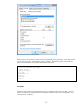
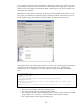
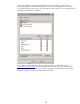
Access Control Lists. A CIFS/Samba share that is opened by a Windows client user has the
functionality to allow the user to initiate a native Windows client File Explorer window and then add,
delete, and manage Access Control Lists on the HP CIFS Server HP-UX file system. See the HP CIFS
Server Administration Guide for more details.
User Data
ACL management is only available if it is correctly configured. In a Unified Login environment, all of
the necessary configuration components are available to enable ACL management. One extra step
that is required – but often overlooked – it to execute the /opt/samba/bin/syncsmbpasswd utility
after any POSIX user addition or deletion in the Active Directory. This utility extracts POSIX user data
out of the Active Directory and populates the /var/opt/samba/private/smbpasswd file. The
smbpasswd file user data is only used by CIFS/Samba to display data to the Windows client for ACL
management of the HP-UX file system. It has no other purpose in a Unified Login environment.
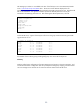
# cat /var/opt/samba/private/smbpasswd
buffy:10000:NO PASSWORDXXXXXXXXXXXXXXXXXXXXX:NO PASSWORDXXXXXXXXXXXXXXXXXX
eroseme:107:NO PASSWORDXXXXXXXXXXXXXXXXXXXXX:NO PASSWORDXXXXXXXXXXXXXXXXXX
smbnull:0:NO PASSWORDXXXXXXXXXXXXXXXXXXXXX:NO PASSWORDXXXXXXXXXXXXXXXXXXXXX
spike:10001:NO PASSWORDXXXXXXXXXXXXXXXXXXXXX:NO PASSWORDXXXXXXXXXXXXXXXXXX
#
The users buffy and spike have been loaded from the Active Directory into smbpasswd. The user
eroseme is a local /etc/passwd user, and can be edited out. The user smbnull is also a local user
created for CIFS/samba management, and can be edited out also.