
Integrate Logins with HP CIFS Server, HP-UX, and Windows 2003R2/2008


43
HP-UX Secure Internet Services Example
HP-UX Secure Internet Services (SIS) provides “kerberized” internet services, like rlogin, telnet, and ftp.
Using the Kerberos settings that exist for the Unified Login configuration is a good starting point for
setting up SIS. To start and stop SIS on the HP-UX 11iv2 test systems:
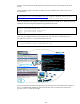
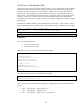
/usr/sbin/inetsvcs_sec enable
/usr/sbin/inetsvcs_sec disable
An overview of SIS is available in the Kerberos Client Admin Guide. Technical documentation for SIS
exists solely as “man 5 sis”. This documentation is minimal and insufficient for effective
troubleshooting. Therefore, the administrator may require advanced troubleshooting skills to get SIS
running consistently in some production environments.
ftp Example
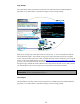
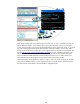
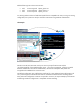
Above is an example of running ftp with SIS enabled. Buffy has logged into the HP-UX atcuxvm6
system and has her default user principal and ticket-granting-ticket for the ATCWIN1.hp.com domain.
With SIS enabled, she executes ftp to atcuxvm5, which also has SIS enabled. Kerberized ftp expects
the Server Principal ftp/atcuxvm5.rose.hp.com to be available, and Buffy requests this from the KDC.
But Samba did not create an ftp principal when the atcuxvm5 server was added to the domain with
the “net ads join” command, so the KDC replies to the request with a “PRINCIPAL_UKNOWN” error,
and then ftp-over-SIS retries with a different principal – host/atcuxvm5.rose.hp.com.
NOTE: The ftp error message for the Service Principal ftp@atcuxvm5.rose.hp.com appears incorrect
due to the “@” where a “/” should be. This is a normal interpretation between the KDC and SIS and
is not an error or defect.
The above example uses the default krb5.keytab file that was created by the HP CIFS Server. The SIS
ftp login is not a “clean” login, so the next step is to modify the krb5.keytab file to add the ftp service