
Integrate Logins with HP CIFS Server, HP-UX, and Windows 2003R2/2008

34
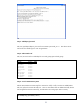
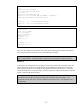
default = FILE:/var/log/krb5lib.log
NOTE: When a krb5.keytab file is generated – either during a “net ads join” or a “net ads keytab
create”, the WRFILE attribute must be un-commented.
NOTE: For HP CIFS Server A.02.04 and later, remove the 5
th
line of the krb5.conf
example above:
default_keytab_name = "WRFILE:/etc/krb5.keytab"
See the “HP CIFS Server and Kerberos” whitepaper Chapter 5 for complete instructions about
WRFILE.
NOTE: The default_tkt_enctypes and default_tgs_enctypes fields must contain all 3 enctypes listed for
SIS telnet to work.
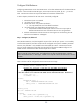
NOTE: HP-UX can utilize backup KDCs when configured to do so in /etc/krb5.conf. This is
accomplished by listing multiple KDC servers in the following manner:
kdc = ATCWINVM1.ATCWIN1.HP.COM:88
kdc = ATCWINVM2.ATCWIN1.HP.COM:88
kdc = ATCWINVM3.ATCWIN1.HP.COM:88
The KDCs will be accessed in the order that they are listed in krb5.conf.
This provides redundancy for authentication access. The LDAP-UX setup
also provided for listing multiple LDAP hosts for Directory Server
redundancy.
Step 2 – Configure Pluggable Authentication Module for Kerberos
Copy /etc/pam.conf to /etc/pam.conf.bak. Make sure that pam.conf.bak does not previously exist
to ensure that it is not overwritten.
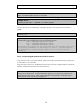
Copy pam.krb5 to pam.conf. The default pam.krb5 file will correctly configure PAM for local HP-UX
Kerberos authentication and for Secure Internet Services.
NOTE: With this Unified Login configuration, any authenticated UNIX user in the Windows domain
can login to any UNIX server. To restrict UNIX server logins by user name, PAM_AUTHZ must be
configured on the HP-UX server. PAM_AUTZ configuration is documented in the LDAPUX Client
Services Admin Guide. See the link in Appendix A.