
Integrate Logins with HP CIFS Server, HP-UX, and Windows 2003R2/2008

32
# pwget
root:
daemon:*:1:5::/:/sbin/sh
bin:*:2:2::/usr/bin:/sbin/sh
sys:*:3:3::/:
adm:*:4:4::/var/adm:/sbin/sh
smbnull:*:101:101:DO NOT USE OR DELETE - needed by
Samba:/var/opt/samba/nologin:/bin/false
.
.
buffy:*:10000:10000::/home/buffy:/bin/sh
spike:*:10001:10001::/home/spike:/bin/sh
#
# grget
root::0:root
other::1:root,hpdb
bin::2:root,bin
sys::3:root,uucp
users::20:root
nogroup:*:-2:
smbnull::101:
.
.
scoobies:*:10000:
vampires:*:10001:
#
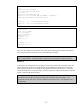
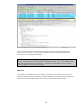
These tests show that the Active Directory users buffy, spike, and the groups scoobies and vampires
are correctly resolved on the HP-UX server using the RFC2307 attributes.
NOTE: Executing pwget and/or grget without specifying users and/or groups may result in excessive
output in large domains. It may be prudent to supply test users and groups for these commands.
Milestone 3
At this point in the configuration, the user buffy can log into the domain from a Windows client and
map a share to the HP CIFS server using Kerberos as the authentication protocol and using HP-UX
LDAP to retrieve the HP-UX server POSIX user and group IDs from the active directory. In this case,
when buffy creates a file on her home share, the owner will be UID 10000 and the group will be GID
10000 – both from the Active Directory.
NOTE: HP CIFS Server provides the ability to manage user and group Access Control Lists (ACLs) on
CIFS/Samba resources (files, directories) using the native Windows client File Explorer. ACL
management with HP CIFS Server requires an additional configuration step. See Appendix C for a
full explanation.