
Integrate Logins with HP CIFS Server, HP-UX, and Windows 2003R2/2008


19
Configure LDAP-UX Client
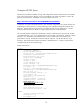
The next step is to configure the HP-UX LDAP-UX Client to retrieve logon user and group data from the
Active Directory server. At the completion of this step, HP-UX commands like “id username”, “grget
groupname” pwget username” will display user and group data from the AD. HP-UX local IDs like
root will continue to reside in /etc/passwd.
Step 1 – Proxy Account
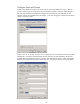
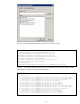
Add an HP-UX server proxy account to the AD. Use the user-computer snap-in on the AD. Name the
proxy user the same as the server uname for consistency and simplicity.
# uname -a
HP-UX atcuxvm5 B.11.23 U ia64 unlimited-user license
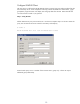
Ensure that the proxy user is a member of the “Domain Users” group only – it does not require
additional group membership.