
Integrate Logins with HP CIFS Server, HP-UX, and Windows 2003R2/2008


15
Configure HP CIFS Server
HP CIFS Server should be installed, running, and configured for Kerberos authentication as a member
server in the Active Directory domain. If there are problems with configuring Kerberos, use the “HP
CIFS Server and Kerberos” whitepaper to correctly configure the server.
http://www.docs.hp.com/en/7213/HPCIFSKerberosV105.doc
To make full use of the Unified Login features, CIFS should be configured to use a keytab file, but only
if HP-UX logins, Internet Services, or Secure Shell logins are required (including NFS usage of CIFS
data sets). Keytab usage is not required for a successful CIFS-Server-Only configuration. See the
Kerberos paper above for full details on configuring HP CIFS Server for keytab usage.
The only CIFS/Samba configuration variable that is specific to Unified Login is the smb.conf variable
“use Kerberos keytab = yes”. The “idmap backend = ad” variable is not required. While the “idmap
backend = ad” variable tells CIFS/Samba to look in the active directory for the incoming user-
authentication local ID - and therefore would normally be required – with HP CIFS Server it is not
functional. The sample smb.conf below enumerates “idmap backend =” in order to clarify that the
variable should not be set for Unified Login.
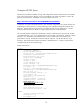
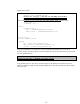
Sample smb.conf file:
[global]
workgroup = ATCWIN1
realm = ATCWIN1.HP.COM
server string = Unified Login Samba Server
interfaces = xx.xx.xxx.xxx
bind interfaces only = Yes
netbios name = ATCUXVM5
netbios aliases =
security = ADS
client schannel = No
server schannel = No
password server = ATCWINVM1.ATCWIN1.HP.COM
log level = 10
log file = /var/opt/samba/log.%m
username map = /etc/opt/samba/username.map
max log size = 1000
machine password timeout = 300
local master = No
wins server = xx.xx.xxx.xxx
ldap ssl = no
template homedir = /home/%U
template shell = /usr/bin/sh
idmap backend =
use kerberos keytab = yes
allow trusted domains = no
read only = No
short preserve case = No
dos filetime resolution = Yes
[homes]
comment = Home Directories
valid users = %S
browseable = No