
Integrate Logins with HP CIFS Server, HP-UX, and Windows 2003R2/2008




10
Unified Login Solution Configuration
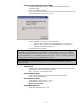
Windows Identity Management for UNIX Installation
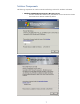
While Services For UNIX is straightforward to install, Identity Management for UNIX is not. To install
it, you will need your installation media. In Control Panel, start Add/Remove Programs. Click on
Add/Remove Windows Components. Select Active Directory Services and click Details.
NOTE: For Windows 2008 screen shots, see Appendix E.
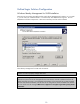
Select Identity Management for UNIX and click Details:
Note: Windows may require that Identity Management for UNIX be installed on the root domain
controller in order to properly manage UNIX users
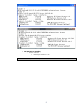
Note: When installing new domain controllers for new Windows 2003 or 2008 domains, the
Administrator password must be changed after the initial domain controller installation because the
default password encryption is not compatible with Kerberos. If the password has not been changed
after the initial domain installation, the HP CIFS Server configuration cannot be added to the domain.
The kinit will fail with the message: KDC has no support for encryption type while getting initial
credentials