
- HP Server User Manual


Chapter 2 65
Installing ITO Agents on the Managed Nodes
General Installation Tips for Managed Nodes
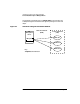
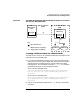
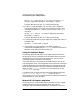
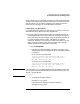
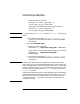
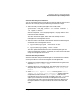
Figure 2-2 Using HP SD-UX Remote Software Depot to Install ITO on HP-UX
10.x and 11.x Managed Nodes
Creating a Software Depot on a Remote Node
To create an HP-UX 10.x or 11.x Software Distributor (SD) Depot for the
installation of ITO managed nodes:
❏ If you don’t have additional licenses, you can only copy the package
locally. If this is the case on the depot node, transfer the ITO software
package from the management server over the WAN to the depot
node using FTP. The ITO software package (opc_pkg.Z) is located in
the following directory on the management server:
for HP-UX 10.x managed nodes:
/var/opt/OV/share/databases/OpC/mgd_node/vendor/hp/\
s[7|8]00/hp-ux10/<
ito_version
>/RPC_DCE_[TCP|UDP]/\
opc_pkg.Z
for HP-UX 11.x managed nodes:
/var/opt/OV/share/databases/OpC/mgd_node/vendor/hp/\
pa-risc/hp-ux11/<ito_version>/RPC_DCE_[TCP|UDP]/\
opc_pkg.Z
❏ Copy an uncompressed package into the /tmp directory and execute
as follows:
Local Area Network
(LAN)
Management
Server
ITO
Package
ITO Agent
ITO Node NITO Node 2
Wide Area Network
(WAN)
Data Transmission
(1)
(2)
Manual transfer of package
Trigger remote installation
Key:
SD Depot
(ITO Node 1)
(1)
(2)
Package
ITO Agent