
- HP Server User Manual


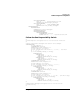
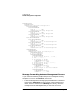
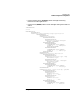
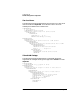

Chapter 5 285
Configuring ITO
Flexible-management Configuration
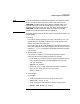
NOTE At least one of the following parts must be used for the definition. ITO
does not interpret any one of the following parts as “always”.
• Match
If the current time is within the defined time period, the time
condition is true.
• Suppress
If the current time is within the defined time period, the time
condition is false.
• TIME FROM <time> TO <time>
Specify a time period. Set the <time> using the format:
<HH>:<MM>
NOTE The FROM <time> must be before the TO <time>. For example: FROM
18:00 TO 24:00 or FROM 0:00 TO 6:00
• WEEKDAY
You can specify every day of the week: Monday, Tuesday,
Wednesday, Thursday, Friday, Saturday, Sunday
• ON <day>
At one day of the week, for example Sunday.
• FROM <day>TO <day>
A time period, for example:
FROM Monday TO Wednesday
•DATE
The date must have one of the following formats:
<MM>/<DD>/<YYYY> <MM>/<DD>/<YY> <MM>/<DD>/*
Note: ITO will not check that the time period is correct. For
example 10/35/* will not be recognized as an invalid date.
ON <date> FROM <date> TO <date>