
Designing a High Performance Network File Server

4
Detailed Server Configuration
This section of the paper describes how the Integrity Superdome server was configured at the end of
this engagement to meet this customer’s application requirements.
Install Required Patches
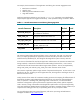
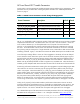
Table 1 below details the patches required to implement this solution. Be sure to check the patch
database on the IT Resource Center (http://itrc.hp.com
) to verify whether these patches are still
current or have been replaced.
Table 1 – Required Patches and Optional Products
Subsystem Patch ID Description
VxFS 3.5 Filesystem PHKL_35239 VxFS 3.5 panic or hang; getdirentries(2)
PHKL_35240 rwsleep locks
PHKL_35241 JFS 3.5 DIO performance; extent rollback
PHKL_35242 JFS 3.5 bmap performance improvement
PHKL_35243 VxFS 3.5 VFS destacking support; DIO hang; bdf
PHKL_35244 vx_vget
ONC/NFS PHNE_35117 Kernel RPC cumulative patch
PHNE_35960 NFS cumulative patch
Spinlock Performance PHKL_34839 Itanium spinlock performance improvement
LAN Common PHNE_34474 LAN cumulative patch
LAN Specific PHNE_32199 IETHER 1000Base-SX/T B.11.23.[01-0505] patch
PHNE_34037 IGELAN 1000Base-SX/T B.11.23.[01-0505] patch
PHNE_32866 GELAN 1000Base-SX/T B.11.23.[01-05] patch
Transport/STREAMS TOUR 3.1
2
Transport Optional Upgrade Release (TOUR) 3.1
Auto Port Aggregation
(Optional Product)
B.11.23.20
3
HP Auto Port Aggregation Software
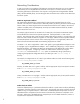
In addition to patching the operating system kernel, NFS, the VxFS filesystem and various networking
components, remember to look for any application-specific patches that may be relevant to your
environment. Check with application vendors for any patches recommended for their products.
2
The Transport Optional Upgrade Release is a software bundle containing many new Transport and STREAMS features and enhancements. It is
available for free download from HP’s Software Depot web site: http://software.hp.com.
3
HP Auto Port Aggregation software is an optional product which may be purchased from HP.