
HP-UX Compartment Login Using Secure Shell (SSH)


6
Running sshd in the INIT Compartment
You can retain an instance of sshd to run in the INIT compartment. Ensure that the instance of sshd
running in INIT also has a dedicated IP address. If the instance of sshd running in INIT is
configured to listen to INADDR_ANY, then it disrupts the communications for other instances of sshd.
Configuring User Compartment Login Access Restrictions
HP-UX Compartment Login (part of the ContainmentExt_B.11.31.01 bundle) can allow users the login
access to one or more compartments in the system. For more information on how to configure and use
the HP-UX Compartment Login feature, see compartment_login(5).
Example:
You have the following users created in the system: user1, user2, user3. If you want to allow
login access for user1 to compartment cmpt1, user2 to compartment cmpt2, and user3 to both
compartments, cmpt1 and cmpt2, then you must perform the following user-role-authorization
configuration:
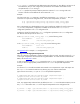
1. Create three new roles.
# roleadm add role1
# roleadm add role2
# roleadm add role3
2.
Assign the users to the newly defined roles.
# roleadm assign user1 role1
# roleadm assign user2 role2
# roleadm assign user3 role3
3.
Assign the compartment login authorizations to the newly defined roles.
# authadm assign role1 hpux.security.compartment.login "cmpt1"
# authadm assign role2 hpux.security.compartment.login "cmpt2"
# authadm assign role3 hpux.security.compartment.login "cmpt1"
# authadm assign role3 hpux.security.compartment.login "cmpt2"
Making the Configuration Persist Across System Reboot
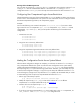
After the above configuration changes are complete, you will have an instance of sshd running in
every compartment defined in the system. To retain the same configuration across system reboot,
configure the startup and shutdown script of sshd: /sbin/init.d/secsh. This startup/shutdown
RC script brings the sshd up and down during system reboot. Therefore, you must modify this script
to retain all the configuration changes, or copy this script to startup the additional instances of sshd.
To avoid losing any changes in this script because of sshd updates, HP recommends that you create
a customized copy of this script for the compartmentalized instances of sshd:
1. Take a copy of the startup script file:
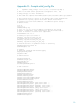
# cp /sbin/init.d/secsh /sbin/init.d/secsh.cmpt
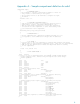
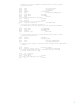
2. Modify the copied script (secsh.cmpt) to start all the instances of sshd in different
compartments. For a sample modified RC script, see
Appendix C.
3. Create a soft link to the copied script in rc2.d:
# cd /etc/rc2.d
# ln –s /sbin/init.d/secsh.cmpt S393secshcmpt
4. If you do not want to start the standard sshd, which usually starts in the INIT compartment, set
SSHD_START to 0 in the /etc/rc.config.d/sshd configuration file.