
HP Value UPS Manager User Manual

54
7. How to modify the Device control parameter
For the HP R3000v UPS:
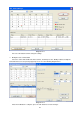
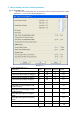
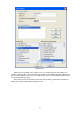
¾ Open the “UPS control parameters” menu from the “Device” menu to pop up “UPS control
parameters” screen. See the following diagram 4-7-1:
Diagram 4-7-1
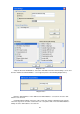
See the following table 4-7-1:
Parameter Unit Maximum Minimum Default
High limit of input frequency on bypass
% 10 2 10
Low limit of input frequency on bypass % 10 2 10
High limit of input voltage on bypass % 20 4 10
Low limit of input voltage on bypass % 20 4 15
ERM number - 4 0 -
ON button can control battery mode
audible warning
- - - Yes
ON button can control bypass mode
audible warning
- - - Yes
Do audible warning when on bypass
mode
- - - Yes
Do audible warning when on battery
mode
- - - Yes
Restore line mode when AC restored - - - Yes
Work on bypass when UPS turned off
- - - No