
Installation Guide, Second Edition - HP Carrier Grade Blade Server bh3710




Chapter 5
hp Carrier Grade Server bh3710 Server Blade Installation Information
Installing and Removing Blades
5-23
NOTE The blue LED will briefly illuminated when power is reestablished as the blade
mates with the backplane connectors.
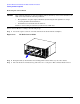
Figure 5-18 Insert the Blade
Step 6. Tighten the small screws in each locking lever (as shown in Figure 5-19). This completes the
installation.
Figure 5-19 Tighten the Locking Screws