
HP Slim Removable SATA Hard Drive Frame/Carrier Kit Installation Guide
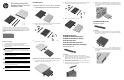

HP ProOne 600 All-in-One
HP Compaq Elite 8300 All-in-One
HP Compaq Pro 6300 All-in-One
Hardware required
Assembly
1. Install the mounting bracket on the rear of the frame with the two
screws provided in the kit.
2. Install the drive. For detailed instructions on installing the drive in a
drive bay, refer to the documentation that came with the computer
or go to http://www.hp.com/support to locate documentation for
your model.
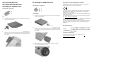
HP Compaq Pro 4300 All-in-One
Hardware required
Assembly
1. Install the mounting bracket on the rear of the frame with the two
screws provided in the kit.
2. Install the drive. For detailed instructions on installing the drive in a
drive bay, refer to the documentation that came with the computer
or go to http://www.hp.com/support to locate documentation for
your model.
3. After installing the drive in the drive bay, install the mounting
screw to secure the frame in place.
European Union Regulatory Notice
Products bearing the CE marking comply with one or more of the
following EU Directives as may be applicable:
Low Voltage Directive 2006/95/EC; EMC Directive 2004/108/EC;
Ecodesign Directive 2009/125/EC; R&TTE Directive 1999/5/EC;
RoHS Directive 2011/65/EU
Compliance with these directives is assessed using applicable European
Harmonised Standards.
The full Declaration of Conformity can be found at the following web
site: http://www.hp.eu/certificates
(Search with the product model name or its Regulatory Model Number
(RMN), which may be found on the regulatory label.)
The point of contact for regulatory matters is Hewlett-Packard GmbH,
Dept./MS: HQ-TRE, Herrenberger Strasse 140, 71034 Boeblingen,
GERMANY.
Korean Notice
Technical Support
Comprehensive technical support is available online at
http://www.hp.com/support.