
Understanding and Designing Serviceguard Disaster Recovery Architectures
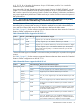
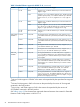
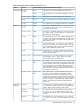

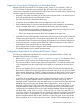
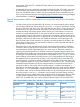



Table 5 Required Mirror Write Cache and Mirror Consistency Recovery settings for SLVM with RAC
(continued)
Oracle FilesMirror Consistency
Recovery Setting
Mirror Write
Cache Setting
SLVM Volume
Group Version
Oracle RAC Supports
Resilvering
1
DatafilesOFFOFF2.1 or laterYes
Control files, redo filesONOFF or ON
1
Currently, no version of Oracle RAC supports resilvering; contact Oracle to determine whether
your version of Oracle supports resilvering.
• Due to the maximum of three images (one original image plus two mirror copies) allowed in
Mirrordisk/UX, if JBODs are used for application data, only one data center can contain
JBODs while the other data center must contain disk arrays with hardware mirroring. The data
center containing the JBODs must mirror the data between the local disks by using
Mirrordisk/UX mirroring. While Mirrordisk/UX with LVM version 2.0 on HP-UX 11i v3 supports
up to five mirror images, HP recommends that having no more than three mirror copies, as
having three or more mirror copies will adversely affect performance on disk writes.
• If using Oracle Automatic Storage Management (ASM) over SLVM, the SLVM volume groups
and logical volumes used for the ASM devices have the same configuration requirements as
a plain SLVM configuration. ASM over SLVM is supported only with SGeRAC configurations.
Special Requirements and Recommendations for using VxVM, CVM and CFS in
Extended Clusters
• The Dirty Region Logging (DRL) feature is highly recommended to be used for resynchronization
after a node failure. RAID-5 mirrors are not supported, because it cannot be verified that both
data centers have a complete copy of all the data. A FastResync map (also known as
FastMirrorResync—FMR) is highly recommended to keep track of changes to a volume when
mirror devices become detached (such as after a data center failure). FMR reduces the amount
of data required to be resynchronized after detached mirror devices are reattached. Without
FMR, the volume manager can only perform a full resynchronization (For example, it cannot
perform an incremental synchronization) when recovering from the failure of a mirror copy
or loss of connectivity to a data center. This can have a large impact on performance and
availability of the cluster if the disk groups are large. Both DRL and FMR are implemented as
bitmaps and are stored together in a version 20 DCO volume that is attached to the “data”
volume. Beginning with version 5.0, VxVM and CVM include a new feature, “site-awareness”,
which simplifies configuring the disk volumes and mirroring in an Extended Cluster, because
it allows the storage in each data center to be tagged with a site ID. A license to enable this
feature is included with specific SG SMS A.02.00, A.02.01, A.02.01.01, and A.03.00
product bundles.
• If you are using CVM or CFS, the CVM Mirror Detachment Policy must be set to “Global.”
• VxVM, CVM, and CFS support up to 32 mirror copies, however increasing the number of
mirror copies adversely affects performance on disk writes.
• In an Extended Cluster, the VxVM/CVM hot relocation feature can be counter productive. If
the inter-site Fiber Channel links fail, or a complete site fails, this feature automatically relocates
plexes to the same storage system in the surviving datacenter. This would result in a
configuration in which both plexes of a volume are stored on subdisks of the same datacenter,
compromising the ability to survive a data center failure at a later time. Therefore disable
VxVM’s hot relocation feature. A convenient way to disable hot relocation for all VxVM/CVM
volumes is to prevent the vxrelocd daemon from starting. This can be achieved by
commenting out the entry (nohup vxrelocd root &) that invokes the vxrelocd daemon
in the startup file (/sbin/rc2.d/S95vxvm-recover) on each node. You must verify these
configuration changes after installing VxVM patches or upgrading to a new version of VxVM
58 Extended Distance Cluster Configurations