
Understanding and Designing Serviceguard Disaster Recovery Architectures




using VxVM, CVM and CFS in Extended Clusters” below for more information using these in
Extended Clusters.
• An Extended Cluster may contain any combination of physical nodes, nPar nodes, vPar nodes,
and HP Integrity Virtual Machine (HPVM) nodes. For more information on configuration of
nPar, vPar, and HPVM nodes in clusters, see HP Serviceguard Cluster Configuration for HP
UX 11i or Linux Partitioned Systems and Designing High Availability Solutions using HP Integrity
Virtual Machines, available at: www.hp.com/go/hpux-serviceguard-docs.
Special Requirements and Recommendations for using LVM and SLVM in Extended
Clusters
• For LVM volume groups using Mirrordisk/UX mirroring, you must activate the volume groups
in the package without LVM quorum (using the vgchange –q n option), after failures involving
the loss of one of the disk arrays. This is because LVM does not allow a volume group to be
activated unless more than 50 percent of the disks in the volume group are present. Please
note that activating LVM volume groups without quorum may cause data loss in some rare
scenarios involving multiple failures, so this option should be used carefully. In some cases,
it may be better to require LVM quorum in the package configuration, which will result in the
package failing to startup if quorum is not present. Or, you could disable LVM quorum for the
packages in the Recovery data center, and disable the automatic start of packages in the
Recovery data center. In both situations, an operator can check the status of the data in the
volume group in the recovery site and determine whether it is safe to proceed and start the
package without LVM quorum.
• If Mirrordisk/UX is used with LVM volume groups, Mirror Write Cache (MWC) and Mirror
Consistency Recovery (MCR) must be set to ON for all mirrored logical volumes. This allows
resynchronization of stale extents after failure of a mirror copy or node crash, rather than
requiring a full resynchronization. For SGeRAC clusters, the required settings for MWC and
MCR depend upon whether your Oracle supports resilvering, the LVM volume group version
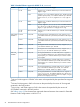
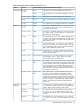
and the type of Oracle files that will reside on the volume. Refer to Table 5 (page 57) for the
required settings. If both MWC and MCR are set to OFF, Oracle performs the resilvering on
the datafiles, based on the redo logs. If MWC is OFF and MCR is ON it means that a full
resynchronization is required for shared volume group mirrors after a node crash, which can
have a significant impact on recovery time. If MWC is ON and MCR is ON, it means that an
incremental resynchronization (of only the changed extents) is required for shared volume
group mirrors after a node crash. Until a resynchronization is complete, data integrity is
vulnerable to any additional failures. You must ensure that the mirror copies reside in different
data centers, so it is recommended to configure physical volume groups for the disk devices
in each data center, and to use Group Allocation Policy for all mirrored logical volumes. Note
that when using the lvdisplay command to view the MWC and MCR settings currently
configured for a logical volume, these values are displayed in the Consistency Recovery field
(a value of MWC indicates MWC=ON and MCR=ON, a value of NOMWC indicates
MWC=OFF and MCR=ON, and a value of NONE indicates MWC=OFF and MCR=OFF).
Table 5 Required Mirror Write Cache and Mirror Consistency Recovery settings for SLVM with RAC
Oracle FilesMirror Consistency
Recovery Setting
Mirror Write
Cache Setting
SLVM Volume
Group Version
Oracle RAC Supports
Resilvering
1
Datafiles, control files, redo
files
ONOFFPrior to 2.1No
Datafiles, control files, redo
files
ONOFF or ON2.1 or laterNo
DatafilesOFFOFFPrior to 2.1Yes
Control files, redo filesONOFF
Extended Distance Cluster on HP-UX 57