
Understanding and Designing Serviceguard Disaster Recovery Architectures


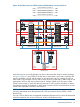
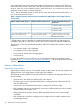

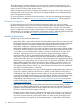


For more information on configuring cross-subnet clusters, see the Managing Serviceguard manual
available at http://www.hp.com/go/hpux-serviceguard-docs and Managing Serviceguard for
Linux, available at http://www.hp.com/go/linux-serviceguard-docs.
SADTA
Metrocluster provides Site Aware Disaster Tolerant Architecture (SADTA) for complex workloads
such as Oracle RAC database and SAP that use CFS, CVM, or SLVM. This solution uses an
additional software feature called the Site Controller Package to provide disaster recovery for
workload databases. For more information on SADTA, see “Understanding Site Aware Disaster
Tolerant Architecture Concepts” (page 37).
NOTE: SADTA is not supported on Linux. However, Site Aware Failover Configuration is supported
on Linux.
Site Aware Failover Configuration
While configuring, you must ensure that the first node in the list is the primary node for running
the package and the subsequent nodes are listed in decreasing order of preference. In a Metrocluster
configuration, the node names list in the package configuration is ordered by site. Node names
from the same site are listed sequentially. The node names of the site with the primary node must
be specified first in the list. The site with the primary node is referred as primary site and the other
site is referred as alternate site in this section.
The Metrocluster package fails over to the alternate site, only when there are no other nodes
available to run it on the primary site. However if a package fails over to the alternate site, any
subsequent failure can result in the package being failed back to an available node on the primary
site. If the failback policy is set to "automatic", the Metrocluster package is moved back to the
primary site even without a failure, as soon as the primary node is capable of running it. In both
cases, the package is unnecessarily moved back to the primary site even when there are nodes in
the alternate site that are capable of running it.
On HP-UX, starting from HP Serviceguard version A.11.18, a new Serviceguard failover policy
site_preferred is introduced that enables operators to optimize the situation by avoiding
unnecessary movement of workloads across sites. When a package is configured with the
site_preferred failover policy, Serviceguard uses a site aware evaluation method to select target
nodes during a failover. Nodes within the site that the package last ran on are considered before
considering nodes on the other site. Starting from HP Serviceguard version A.11.20, a new
Serviceguard failover policy site_preferred_manual is introduced for failover packages
configured in a Metrocluster. This failover policy provides automatic failover of packages within
a site and manual failover across sites.
Starting from HP Serviceguard for Linux A.11.20.10, site_preferred and
site_preferred_manual Serviceguard failover policies are supported for failover packages
configured in a Metrocluster.
During a failover, the HP Serviceguard moves the package to the next available node from the list
of NODE_NAME entries that belong to the site that the package last ran on. If there is no node
available in the list of NODE_NAME entries for a SITE, the package does not automatically failover
to the other site. In such instances, manual intervention is required to start the package.
You can configure either of these failover policies for both, the regular Metrocluster failover packages
and Site Controller Packages.
NOTE: For a Metrocluster package, HP recommends that you set the failover_policy
parameter to site_preferred.
Volume Monitor Configuration
On HP-UX, starting from HP Serviceguard A.11.20, Volume Monitor configuration is introduced
to provide a means for effective and persistent monitoring of VxVM or LVM storage volumes.
Understanding Metrocluster 25