
Installation Guide, Fifth Edition - HP 9000 rp7420 Server


Chapter 4
Cabling and Power Up
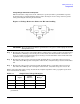
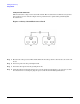
MP Core I/O Connections
68
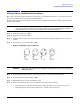
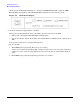
On the front of the HP 9000 rp7420 Server, a solid green Standby Power LED, a solid green MP
Present LED, and a flashing amber Attention LED will illuminate after about 30 seconds.
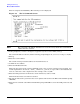
Figure 4-6 Front Panel Display
2. Check the bulk power supply LED for each BPS.
When on, the breakers distribute power to the BPSs. AC power is present at the BPSs:
• When power is first applied. The BPS LEDs will flash amber.
• After 30 seconds has elapsed. The flashing amber BPS LED for each BPS becomes a flashing green
LED.
Refer to power cord policies to interpret LED indicators.
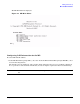
3. Log in to the MP:
a. Enter Admin at the login prompt. The login is case sensitive.
It takes a few moments for the MP prompt to display. If it does not, be sure the laptop serial device
settings are correct: 8 bits, no parity, 9600 baud, and na for both Receive and Transmit. Then, try
again.
b. Enter Admin at the password prompt. The password is case sensitive.