
Installation Guide, Fifth Edition - HP 9000 rp7420 Server


Chapter 3
Installing Accessories
Wheel Kit Installation
51
NOTE The caster covers are designed to fit on either side of the server.
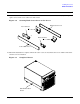
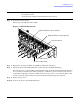
16. Insert the slot on the caster cover into the front caster. Secure the cover to the server by tightening the
captive screw on the cover at the rear of the server.
Figure 3-6 Securing Each Caster Cover to the Server
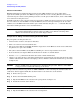
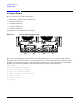
17. Wheel kit installation is complete when both caster covers are attached to the server and the front bezel
and all covers are installed.
Figure 3-7 Completed Server
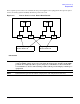
Rear Casters
Front Casters
Right Caster Cover
Left Caster Cover
Attached Caster
Cover