
Installation Guide, Fifth Edition - HP 9000 rp7420 Server



Chapter 3
Installing Accessories
Wheel Kit Installation
48
4. Unfold bottom cardboard tray.
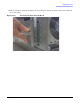
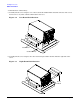
5. Carefully tilt the server and place one of the foam blocks (A6093-44002) under the left side of the server.
Do not remove any other cushions until instructed to do so.
Figure 3-2 Left Foam Block Position
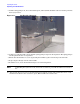
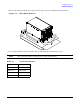
6. Carefully tilt the server and place the other foam block provided in the kit under the right side of the
server.
Figure 3-3 Right Foam Block Position
Foam Block
Cardboard Tray
Foam
Block