
Installation Guide, Fifth Edition - HP 9000 rp7420 Server

Chapter 1
Introduction
Detailed HP 9000 rp7420 Server Description
22
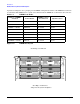
A quad seen in Figure 1-9 is a grouping of four DIMMs. Configurations with 8 or 16 DIMM slots loaded are
recommended. The DIMM sizes in a quad can be different but the DIMMs in a rank must be the same size.
Figure 1-9 DIMM Slot Layout
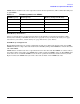
Table 1-4 DIMM Load Order
Number of DIMMs
Installed
Action Taken
DIMM Location
on Cell Board
Quad Location
2 DIMMs = 1 Rank Install First 0A and 0B Quad 0
4 DIMMs = 2 Ranks Add Second 1A and 1B Quad 1
6 DIMMs = 3 Ranks Add Third 2A and 2B Quad 2
8 DIMMs = 4 Ranks Add Fourth 3A and 3B Quad 3
10 DIMMs = 5 Ranks Add Fifth 4A and 4B Quad 0
12 DIMMs = 6 Ranks Add Sixth 5A and 5B Quad 1
14 DIMMs = 7 Ranks Add Seventh 6A and 6B Quad 2
16 DIMMs = 8 Ranks Add Last 7A and 7B Quad 3
Rear Edge of Cell Board
Front Edge of Cell Board
DIMM 3B
DIMM 7B
DIMM 7A
DIMM 3A
DIMM 2B
DIMM 6B
DIMM 6A
DIMM 2A DIMM 0A
DIMM 5A
DIMM 4A
DIMM 4B
DIMM 0B
DIMM 1A
DIMM 5B
DIMM 1B
QUAD 3
QUAD 2
QUAD 1
QUAD 0
(Plugs into the System Backplane)