
Installation Guide, Fifth Edition - HP 9000 rp7420 Server

Chapter 1
Introduction
Detailed HP 9000 rp7420 Server Description
21
DIMMs must be loaded in sets of two at specific locations. For best performance, HP recommends loading sets
of eight DIMMs.
Main Memory Performance
Latency to main memory is an important parameter in determining overall system performance. With
memory buses running at 125 MHz, the latency for a page hit is 8.5 cycles (68 ns), the latency for a page
closed is 11.5 cycles (92 ns), and the latency for a page miss is 14.5 cycles (116 ns).
Valid Memory Configurations
The HP 9000 rp7420 Server is capable of supporting as little as 0.5 GB of main memory using two 256 MB
DIMMs installed on a single cell board and as much as 128 GB by filling all 16 DIMM slots on both cell boards
with 4 GB DIMMs.
DIMMs must be loaded in sets of two at specified locations on the cell board. Two DIMMs are called a rank, so
two ranks would be equivalent to four DIMMs, three ranks would be six DIMMs, and so on. The DIMMs must
be the same size in a rank. The DIMMs across all cells in a partition should have identical memory loaded.
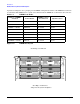
Figure 1-9 shows the DIMM slot layout on the cell board. See Table 1-4 for DIMM load order.
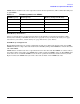
Table 1-3 HP 9000 rp7420 Server DIMMs
DIMM Capacity Total Capacity Memory Component Density
256 MB 8 GB 32 Mb
512 MB 16 GB 64 Mb
1 GB 32 GB 128 Mb
2 GB 64 GB 256 Mb
4 GB 128 GB 512 Mb