
User Guide - rp5400 Family of Servers


Cross-Referencing Chassis Log Errors to rp54xx FRUs
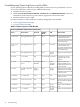
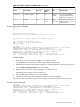
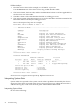
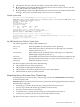
Use the following table to identify the failing FRU from the Chassis Log information. You can
also use the online Error Chassis Log-to-FRU Decoder utility.
1. Read the Chassis Log entry.
2. Match the SOURCE, SOURCE DETAIL, SOURCE ID, and PROBLEM DETAIL values (see
table below) in the Chassis Log entry with the appropriate values in the table.
3. Read the table from left to right.
Use these examples to understand how to identify failing FRUs with the table:
• Power Supply Failure Example
• Processor Failure Example
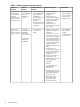
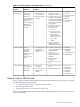
Table 6-2 Chassis Log Error to FRU Decoder
Chassis Log Field Values and Descriptions from Log Entry
Action to TakeFRUProblem
Detail
Source IDSource DetailSource
From BCH Main Menu go
to the Info Menu and
execute the PR command to
determine which processor
is not functioning.
ProcessorN/AN/ANot Applicable (N/A)1 - Processor
From BCH Main Menu go
to the Info Menu and
execute the PR command to
determine which processor
is not functioning.
ProcessorN/AN/ANot Applicable (N/A)2 - Processor
Cache
Replace the System Board.System
Board
N/AN/ANot Applicable (N/A)3 - PDH
Check that AC is being
supplied to all power
supplies.
AC Power9 - Power OffN/A1 - AC Mains4 - Power
Replace the Processor
Support Module (on the
System Board) referenced
in the Source ID.
CPU
Support
Module
N/ACPU Support
Module #
3 - Low Voltage DC
Power
4 - Power
Replace the Power Supply
(in the front of the system
behind the bezel) referenced
in the Source ID.
Power
Supply
N/APower
Supply #
4 - High Voltage DC
Power
4 - Power
Replace the Fan referenced
in the Source ID.
FanN/AFan #3 - Cabinet Fan6 - Platform
The Service Processor is on
the GSP I/O board. Replace
the GSP
Core I/ON/AN/A6 - Service Processor6 - Platform
Replace Platform Monitor
card.
Power
Monitor
N/AN/A7 - Power Monitor6 - Platform
Replace the System Board.System
Board
N/AN/A1 - Controller7 - Memory
76 Troubleshooting