
User Guide - rp5400 Family of Servers

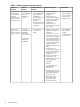
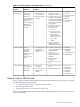
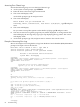

Table 6-1 Problem Symptoms and Repair Actions
Potential FRUsTroubleshooting StepsNormal Functioning
Indicators
Problem
Indicators
Problem or
Symptom
• No AC present
• Power Supplies
• Power Converter
• System Board
• Display Board
1. AC must be present.
Check that PDU is
plugged in.
2. Ensure there are 2
working power supplies
(1 supply for rp5400). The
LED on each supply
should be lit.
3. Check for Service
processor prompt (CTRL
B at console).
• Power switch Off.
• Front Panel POWER
LED should be
FLASHING to
indicate presence of
Housekeeping
voltage.
• Power LED on GSP
board should be lit
solid green.
Front Panel
Power LED OFF
when AC is
plugged into
system.
No indication of
Housekeeping
voltage present
when AC
connected and
power switch in
Standby position.
• Power Supplies
• CPU Support
Module
• Platform Monitor
• System Board
1. Check for remote power
shutdown via GSP>PC
command.
2. Check Error Chassis Logs.
Look for Error Chassis
Log with a Source Detail
= Low Voltage DC Power.
This indicates a failure of
one of the CPU Support
Modules. The failing CPU
support module is
indicated in the Source ID
field.
3. Ensure there are 2
working power supplies
(1 supply for rp5400). The
LED on each supply
should be lit.
4. Check to see if GSP can
communicate with
platform monitor. Execute
the following GSP
command:
GSP>PC
You should get power
monitor status
information.
5. Housekeeping 1 voltage
present indication. Check
that platform monitor
power LED is lit.
6. Platform Monitor
functioning. Check
platform monitor
heartbeat LED is lit.
• Power switch On.
• Power LED on
SOLID.
Front Panel
Power LED stays
BLINKING
when Power
Switch is turned
on.
ATTENTION
LED may be
FLASHING.
System won't
power on when
Front Panel Power
switch is turned
on.
74 Troubleshooting