
User Guide - rp5400 Family of Servers
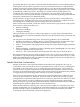
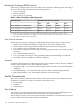
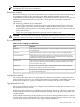
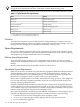
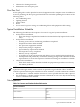
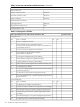
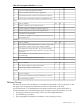


Table C-4 Customer and Hewlett-Packard Information (continued)
Customer Information
Zip or postal code:
Phone No.:Primary customer contact:
Phone No.:Secondary customer contact:
Phone No.:Traffic coordinator:
Hewlett-Packard information
Order No:Sales representative
Date:Representative making survey
Scheduled delivery date
Table C-5 Site Inspection Checklist
Comment or DatePlease check either Yes or No. If No, include comment# or date
Computer room
NoYesArea or conditionNo.
Is there a completed floor plan?1.
Is there adequate space for maintenance needs?
Front 36 in (91.4 cm) minimum, Rear 36 in (91.4 cm) minimum are
recommended clearances.
2.
Is access to the site or computer room restricted?3.
Is the computer room structurally complete?
Expected date of completion?
4.
Is a raised floor installed and in good condition?5.
Is the raised floor adequate for equipment loading?6.
Are there channels or cutouts for cable routing?7.
Is there a remote console telephone line available with an RJ11 jack?8.
Is a telephone line available?9.
Are customer supplied peripheral cables and LAN cables available
and of the proper type?
10.
Are floor tiles in good condition and properly braced?11.
Is floor tile underside shiny or painted? If painted, judge the need
for particulate test.
12.
Power and lighting
NoYesArea or conditionNo.
Are lighting levels adequate for maintenance?13.
Are there AC outlets available for servicing needs? (i.e. vacuuming)14.
Does the input voltage correspond to equipment specifications?15.
Is dual source power used? If so, identify type(s) and evaluate
grounding.
15A
Does the input frequency correspond to equipment specifications?16
Are lightning arrestors installed inside the building?17.
156 General Site Preparation Guidelines